
WordPress 6.9 Frontend Performance Field Guide
This post is the latest in a series of updates focused on the performance improvements of major releases (see 6.8, 6.7, 6.6, 6.5, 6.4, 6.3, and 6.2).
WordPress 6.9 is the second and final major release of 2025. It includes numerous improvements to the performance of loading pages on the frontend:
- Scripts: improve script loading performance by adding support for fetchpriority, printing script modules in the footer, and optimizing the emoji detection script.
- Styles: optimize loading of stylesheets by loading block styles on demand in classic themes, omitting styles for hidden blocks, increasing the inline style limit from 20K to 40K, and inlining minified stylesheets in block themes.
- Introduce the template enhancement output buffer to implement optimizations previously impossible (such as the aforementioned on-demand style loading in classic themes).
- More: spawn WP Cron at shutdown, eliminate layout shifts in the Video block, fix RSS feed caching, and so on.
The performance changes in this release include 38 Trac tickets (26 enhancements, 11 defects, 1 task) and 31 Gutenberg PRs, although this post does not describe improvements to the performance of the editor nor the database query and caching optimizations. This post highlights the key changes to the frontend for site visitors, as well as looking at their impact in terms of web vitals metrics, such as TTFB, FCP, and LCP.
Read more: WordPress 6.9 Frontend Performance Field GuidePerformance Improvements
Support specifying fetchpriority for scripts and script modules
Problem: Browsers load scripts with high priority which adds contention for the critical rendering path.
As of 6.3, WordPress started adding the fetchpriority=high attribute to IMG tags which it determines are likely to be the Largest Contentful Paint (LCP) element (see #58235). This fetchpriority attribute is also supported on elements beyond IMG, and it can have other values besides high, namely low, and auto. As a way to complement adding fetchpriority=high to the likely LCP IMG element, a way to further prioritize loading of that LCP image resource is to add fetchpriority=low to deprioritize other elements which are known to not be in the critical rendering path. In 6.8 this ability to specify fetchpriority is added for scripts and script modules (and modulepreload links).
By default, browsers load scripts with a high priority, and this is especially true for blocking scripts. Browsers diverge in their default fetch priorities for classic scripts with defer or async loading strategies, but they all load script modules with a high priority even though they intrinsically have a deferred loading. Blocks have had their view scripts printed in the , reasoning that it allowed them to be discovered earlier. However, now that all core blocks use the Interactivity API which requires script modules, this means that they are adding network contention for loading any LCP element resource. This is especially wasteful for blocks using the Interactivity API since they use server-side rendering which by nature moves their scripts out of the critical rendering path.
So in WordPress 6.9, script modules for interactive blocks (using the Interactivity API) get fetchpriority=low by default. This includes custom blocks not in core. In addition to fetchpriority=low being the default for interactive blocks’ view script modules, it is also the default for the comment-reply classic script.
In terms of the API for WP_Scripts, a fetchpriority key is added to the $args array passed to wp_register_script() and wp_enqueue_script(). The valid values are auto, low, and high. The default value is auto, which browsers usually treat the same as high (unless the script also has defer or async). The default is subject to change in future versions. To register and enqueue a script to be printed in the footer with a low fetch priority:
wp_enqueue_script(
	'foo',
	plugins_url( 'foo.js', __FILE__ ),
	array(),
	'1.0',
	array(
		'in_footer'     => true,
		'strategy'      => 'defer',
		'fetchpriority' => 'low',
	)
);
This results in the following being printed:
You may change the fetch priority for an existing script as follows:
wp_script_add_data( $handle, 'fetchpriority', 'low' );In the same way that the introduction of script loading strategies in #12009 introduced $args as the 5th parameter to wp_register_script() and wp_enqueue_script(), the same has been done for script modules in the wp_register_script_module() and wp_enqueue_script_module() functions (as well as WP_Script_Modules::register() and WP_Script_Modules::enqueue()). The valid values are the same as with scripts above. To register a script module with a fetch priority of low:
wp_register_script_module(
	'foo',
	plugins_url( 'foo.js', __FILE__ ),
	array(),
	'1.0',
	array(
		'fetchpriority' => 'low',
	)
);
To change the priority of an existing script module, you can use the new WP_Script_Modules::set_fetchpriority() method:
wp_script_modules()->set_fetchpriority( $handle, 'low' );The fetchpriority for an enqueued script or script module propagates back to any dependencies, overriding any assigned fetchpriority on the dependency. This includes the modulepreload links for script modules. For example, the following script module dependency bar lacks any explicit fetchpriority (and thus defaults to auto), but there is a dependent script module foo which has an explicit fetch priority of low:
wp_register_script_module(
	'foo',
	plugins_url( 'foo.js', __FILE__ ),
	array(),
	'1.0',
	array(
		'fetchpriority' => 'low',
	)
);
To change the priority of an existing script module, you can use the new WP_Script_Modules::set_fetchpriority() method:
wp_script_modules()->set_fetchpriority( $handle, 'low' );The fetchpriority for an enqueued script or script module propagates back to any dependencies, overriding any assigned fetchpriority on the dependency. This includes the modulepreload links for script modules. For example, the following script module dependency bar lacks any explicit fetchpriority (and thus defaults to auto), but there is a dependent script module foo which has an explicit fetch priority of low:
wp_register_script_module( 'bar', plugins_url( 'bar.js', __FILE__ ), '1.0' );
wp_enqueue_script_module(
	'foo',
	plugins_url( 'foo.js', __FILE__ ),
	array( 'bar' ),
	'1.0',
	array(
		'fetchpriority' => 'low',
	)
);
The resulting markup on the page is as follows, showing both get fetchpriority=low:
For additional background and performance metrics, see Improve LCP by Deprioritizing Script Modules from the Interactivity API (personal blog).
Impact: When testing a site with the Twenty Twenty-Five theme on a page with one interactive block (the Navigation block) and a featured image (the LCP element), the addition of fetchpriority was seen to improve LCP by a median ~8% over an emulated broadband connection.
Support printing script modules in the footer
Trac: #63486
Problem: Non-essential scripts in the head add network contention for resources in the critical rendering path.
Related to the preceding enhancement where fetchpriority support was added to scripts, another deprioritization enhancement was added to WP_Script_Modules in this release: the ability to print script modules in the footer. This improvement brings WP_Script_Modules in closer alignment with WP_Scripts. The in_footer key in the $args parameter for wp_register_script() and wp_enqueue_script() is now also supported on wp_register_script_module() and wp_enqueue_script_module(). As with WP_Scripts, the default value for in_footer remains false. For example:
wp_enqueue_script_module(
	'foo',
	plugins_url( 'foo.js', __FILE__ ),
	array(),
	'1.0',
	array(
		'in_footer' => true,
	)
);
Results in the following being printed at wp_footer:
The modulepreload links for any script module static dependencies will remain printed at wp_head.
The location at which an existing script module is printed can be updated via the new WP_Script_Modules::set_in_footer() method, for example:
wp_script_modules()->set_in_footer( $handle, true );Being able to print script modules in the footer is currently only relevant to block themes, as classic themes already printed all script modules in the footer. However, as seen below with loading block styles on demand in classic themes, the template enhancement output buffer could be used to hoist script modules originally intended for the .
As referenced in the previous section, for additional background and performance metrics, see Improve LCP by Deprioritizing Script Modules from the Interactivity API (personal blog).
Impact: Since a script module is loaded with a high fetch priority by default, simply moving it to the footer reduces network contention for resources in the critical rendering path (e.g. the LCP image). Similarly to the above benchmarks with adding fetchpriority=low, printing a script module in the footer improves LCP by a median ~7% when benchmarking a page in Twenty Twenty-Five with the Navigation block and the LCP element being the featured image, over an emulated broadband connection. When a script module is registered with both fetchpriority=low and in_footer=true then the LCP reduction was measured to be ~9% with the same conditions, so a ~2% improvement when combined.
Convert emoji detection script to script module and move to footer
Problem: The emoji detection script was adding 3KB of inline blocking JS to the critical rendering path.
As a follow-up to #58472 from WordPress 6.3, the emoji detection script (i.e. emoji loader) has been further optimized to be removed from the critical rendering path. While the detection script has always been an inline script which minimized its performance impact, a non-module inline script still blocks the HTML parser from continuing until the script has executed. This contributes to a render delay and thus a degraded LCP. The emoji detection script serves as a fallback in case the operating system doesn’t support the latest emoji, and even then any fallback emoji image it loads would not be the LCP element. Lastly, the detection script waits until DOMContentLoaded anyway to initiate any emoji loading. All of this contributes to the need to deprioritize the emoji detection script.
In WordPress 6.9, the emoji detection script has been converted from a classic (blocking) inline script to an inline script module. This prevents the script from blocking the HTML parser. Furthermore, since a script module is deferred to be executed when the DOM has been fully constructed, it has no benefit being located in the head, and so it is moved to the footer. It is much better to reserve that “head -room” for code which is part of the critical rendering path, and to reallocate that ~3KB from the emoji detection script to instead inline additional CSS (see below). In the future it could be converted from an inline script module to an external one, per #64259.
As part of the emoji detection script modernization, the emoji settings are no longer injected into the inline script but are instead exported as JSON into an application/json script. This follows the recent “pull” pattern for exporting data for script modules via the script_module_data_{$module_id} filter. There is a slight chance for a back-compat breakage here for any plugins that may depend on the _wpemojiSettings global variable. The emoji detection script parses the JSON out of script#wp-emoji-settings when it executes and immediately populates the _wpemojiSettings global variable so it will be defined by the time the DOMContentLoaded event fires. But if a plugin expects this variable to be defined before DOMContentLoaded (which is unlikely), then to remain compatible it should be updated to obtain the emoji settings as follows:
let wpEmojiSettings = window._wpemojiSettings;
if ( ! wpEmojiSettings ) {
	const settingsScript = document.getElementById( 'wp-emoji-settings' );
	if ( settingsScript ) {
		wpEmojiSettings = JSON.parse( settingsScript.text );
	}
}
Some sites remove the emoji detection script altogether to improve performance. For example, this commonly involves the following PHP code:
remove_action( 'wp_head', 'print_emoji_detection_script', 7 );For backwards compatibility, this remains a valid way to prevent this script from being printed. Unhooking that print_emoji_detection_script() function from running prevents it from adding an action to print the emoji detection script at wp_print_footer_scripts.
Impact: The performance impact of converting the emoji detection script to a script module and moving it from wp_head to wp_footer is largely imperceptible on a high-end or mid-range device. But on a low-tier mobile phone, the impact can be measured. Over 100 page loads to the Sample Page in the Twenty Twenty-Five theme while emulating a low-tier mobile phone, switching to a script module improves FCP (First Contentful Paint) by ~7% and LCP by ~4%. When also moving the emoji detection script to the footer, an additional 1% to 2% improvement to FCP and LCP are measured when emulating a Fast 4G network connection. Note that the long task identified previously in #58472 was also noticed while profiling on a lower-powered device.
Increase inline style limit from 20K to 40K bytes
Problem: External stylesheets are render-blocking which negatively impacts FCP and LCP.
There were a couple key block-styles loading enhancements introduced back in WordPress 5.8:
The first involved splitting up the large wp-block-library stylesheet (120KB minified) into separate stylesheets for each block. The overall amount of CSS added to the page could then be greatly reduced by just loading the styles on demand for the blocks actually used. (This ability to load separate block styles on demand was limited to block themes, but see below where this is enabled for classic themes in 6.9 as well.) Given that the separate block stylesheets are often quite small (1.5KB average and 300B median), it makes sense to inline them to avoid the negative performance impact of external stylesheets which are render-blocking.
Minified block stylesheet file sizes
Aside: For WordPress 7.0, we should really try to reduce the amount of CSS used in the Cover, Navigation, Gallery, and Social Links blocks. See Gutenberg#69613.
| Size (Bytes) | Block |
|---|---|
| 19126 | cover |
| 16879 | navigation |
| 16120 | gallery |
| 11762 | social-links |
| 6758 | image |
| 3888 | table |
| 2609 | media-text |
| 2389 | search |
| 2367 | comments |
| 2242 | button |
| 1991 | post-comments-form |
| 1837 | latest-posts |
| 1833 | post-featured-image |
| 1596 | embed |
| 1584 | columns |
| 1521 | post-template |
| 1395 | buttons |
| 1302 | latest-comments |
| 1168 | accordion-heading |
| 1165 | heading |
| 1118 | pullquote |
| 764 | query-pagination |
| 738 | comments-pagination |
| 699 | quote |
| 661 | calendar |
| 655 | paragraph |
| 654 | file |
| 654 | post-navigation-link |
| 652 | rss |
| 513 | accordion-item |
| 503 | tag-cloud |
| 457 | text-columns |
| 453 | site-logo |
| 432 | comment-template |
| 405 | separator |
| 404 | page-list |
| 358 | post-author |
| 339 | post-excerpt |
| 316 | navigation-link |
| 293 | categories |
| 291 | video |
| 287 | footnotes |
| 281 | read-more |
| 261 | post-title |
| 232 | site-title |
| 227 | accordion-panel |
| 216 | code |
| 196 | term-description |
| 156 | audio |
| 138 | avatar |
| 135 | preformatted |
| 124 | comment-content |
| 117 | group |
| 117 | post-terms |
| 116 | term-template |
| 101 | verse |
| 95 | list |
| 89 | archives |
| 81 | details |
| 54 | post-author-biography |
| 52 | post-comments-count |
| 52 | comment-author-name |
| 51 | post-comments-link |
| 51 | comment-reply-link |
| 50 | post-time-to-read |
| 50 | comment-edit-link |
| 49 | post-author-name |
| 49 | math |
| 45 | site-tagline |
| 45 | comment-date |
| 44 | query-title |
| 44 | query-total |
| 43 | term-count |
| 42 | post-date |
| 42 | term-name |
| 41 | loginout |
| 41 | post-content |
| 28 | spacer |
To inline small stylesheets, WordPress iterates over all enqueued styles which have a path data supplied for where the stylesheet can be found on the filesystem. It then reads each CSS file and converts it into an inline style, up until the total amount of inlined CSS reaches the default limit of 20KB. (There is no caching currently involved in wp_maybe_inline_styles().) Inlining of styles is not limited to block stylesheets. Any stylesheet with path data added is able to be inlined. This limit can be customized via the styles_inline_size_limit filter.
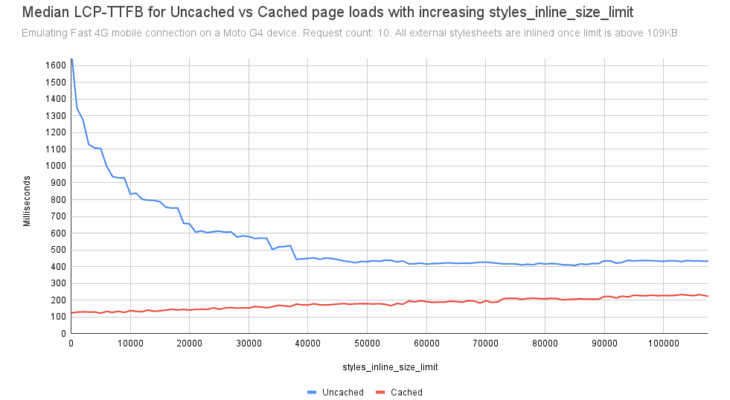
The 20KB default limit for inline CSS was a conservative starting point which was intended to be raised in the future. While inlining 100% of CSS can maximize the page load time improvement for first-time visitors, a key concern is how inlining can negatively impact repeat visitors. When all CSS is loaded from external stylesheets, any repeat page views result in that CSS being loaded from the browser cache. When all the CSS is inlined, however, first time visitors and repeat visitors alike have to re-download all the CSS for every page load. What is needed is to measure the LCP impact of increasing the limit of inline CSS on both initial and repeat page loads. This was done in #63018. When benchmarking with network conditions emulating either broadband or Fast 4G, the results are similar. Page load time grows linearly for cached (repeat) visits whereas page load time decreases with exponential decay for initial (uncached) visits. The point at which the exponential decay reaches the point of diminishing returns is when the styles_inline_size_limit is around 40KB:
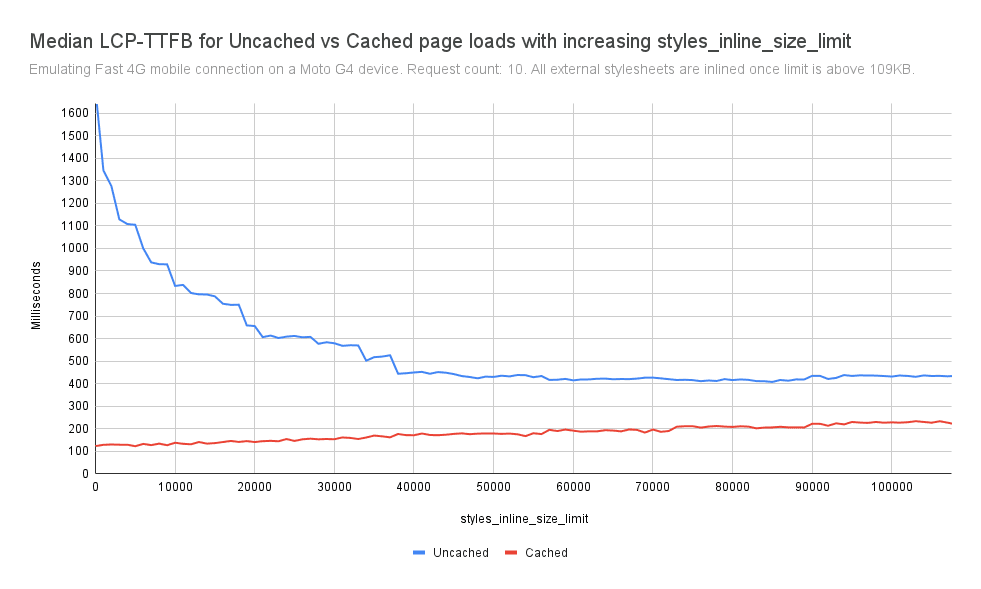
Impact: On a Fast 4G connection, increasing the limit from 20 to 40 KB:
- Cached visits: LCP-TTFB increases from 141.3 to 171.6 milliseconds (+30.3 ms, +21.44%)
- Uncached visits: LCP-TTFB decreases from 655.7 to 449.9 milliseconds (-205.8 ms, -31.39%)
So the percentage improvement for initial visits is larger than the percentage regression for repeat visits, and the relative improvement for initial visits (-205.8 ms) is much larger than the relative regression for repeat visits (+30.3 ms).
A note regarding oEmbed discovery links
With the increased amount of inline CSS in the , it was found (#64178) that the oEmbed discovery links could be pushed too far down in the HTML to be discovered by WordPress by default. So as part of increasing the default amount of inline CSS, the oEmbed discovery links (via wp_oembed_add_discovery_links()) are now printed before the scripts and styles. Existing code that unhooks that function from the wp_head action will continue to work, but the preferable way to disable the links is to use the dedicated oembed_discovery_links filter:
add_filter( 'oembed_discovery_links', '__return_empty_string' );Minify and inline block theme stylesheets
Problem: Stylesheets used in two core block themes were unminified and unable to be inlined, causing render-blocking that negatively impacted FCP and LCP.
Block themes generally do not need to define their own stylesheets, since the styles come from global styles (theme.json) and the existing separate block styles. Indeed, the bundled themes Twenty Twenty-Three and Twenty Twenty-Four do not enqueue any CSS file. With the increase in the inline CSS limit (see above), this means such themes can load without any render-blocking resources, which greatly improves LCP. Nevertheless, the Twenty Twenty-Two and Twenty Twenty-Five themes do enqueue their own stylesheets, although they are quite small when minified: ~2.5 KB and ~600 B respectively. The stylesheets’ small size make them prime candidates for inlining, but until now they haven’t for two reasons: no stylesheets for bundled themes have been minified and none have the path data supplied.
In #63012, CSS minification has been introduced specifically for the core block themes, and the path data was added in #63007. In the same way as core, the minified styles (style.min.css) are served by default, with the unminified versions (style.css) served when SCRIPT_DEBUG is enabled.
As a reminder, site owners are highly discouraged from using the Theme File Editor in the admin to modify files in themes installed from the directory (an additional warning was added in #63012 for this). As of the latest versions of Twenty Twenty-Two and Twenty Twenty-Five, changes to the style.css will not appear for site visitors by default since they will be served style.min.css instead. Site owners are strongly encouraged to use the Site Editor to supply additional styles instead. (A new admin notice about this appears in the Theme File Editor when modifying a CSS file.) If these core themes are forked, changes to the style.css can be re-minified using the newly-distributed package.json via npm install && npm run build.
Minifying the CSS in bundled classic themes is being tracked in #64109.
Impact: When benchmarking the Sample Page in a stock WordPress install, eliminating all render-blocking stylesheets from Twenty Twenty-Five can improve LCP by ~36% on an emulated Fast 4G connection. And on an emulated Slow 3G connection, inlining all styles can improve LCP by ~45%! For more information, see Minified CSS Inlining (personal blog).
Omit styles (and scripts) for hidden blocks by default
Trac: #63676
Problem: Scripts and styles for hidden blocks were being added to the page even though unused.
In WordPress 5.8 (via #50328), core added the ability to conditionally print scripts and styles for blocks which are actually used on the page. (Initially this only applied to block themes, but as of #64099 it also applies to classic themes, per below.) Nevertheless, when a block didn’t output any markup, its assets would still get printed. This could be easily seen on block themes when a featured image was not assigned to a post but the template includes a Featured Image block. When looking at the single template for that post, you’d see the stylesheet for the Featured Image block in the HTML page, even though the block is absent:
The same would be true for the Site Logo and Tagline blocks when they appear in the template (as they are in Twenty Twenty-Five) but have no logo or tagline set. Likewise, when a post has comments disabled, the CSS for the Comments block would still appear in the page even when no comments are present. These stylesheets amount to ~5KB of unused CSS. This issue becomes more pronounced in 6.9 with the introduction of Block Visibility support via #64061. (The issue could be observed with the Block Visibility plugin as well.) When a block is hidden in the editor, its scripts and styles would still get needlessly enqueued. This would negatively impact the performance of the page.
So in 6.9, after a block is rendered, any scripts and styles that it enqueues will get dequeued if it turns out that the block is not ultimately printed. This works with nested blocks, so if you have a Video block nested deep inside a Group block, and yet you hide the Group block, then the styles for the Video block will be omitted from the page.
In some cases, a site might depend on the assets (scripts and styles) associated with a hidden block. To accommodate this unusual scenario, a new enqueue_empty_block_content_assets filter is introduced to force scripts and styles for hidden blocks to be enqueued. For example, to force the assets for all hidden blocks to be enqueued:
add_filter( 'enqueue_empty_block_content_assets', '__return_true' );The block name is supplied as the second argument to this filter, so your filter callback can conditionally force the assets for a specific hidden block to be enqueued. For example, to enqueue the assets for the Featured Image block even when there is no featured image assigned:
add_filter(
	'enqueue_empty_block_content_assets',
	function ( $enqueue, $block_name ) {
		if ( 'core/post-featured-image' === $block_name ) {
			$enqueue = true;
		}
		return $enqueue;
	},
	10,
	2
);
This should only be done as needed.
Impact: This can reduce 5KB or more of CSS on the page, making room for inlining critical CSS. This also reduced unused JavaScript, potentially improving TBT (Total Blocking Time) and INP (Interaction to Next Paint) metrics.
Load block styles on demand in classic themes
Problem: Classic themes add much more CSS than may be actually needed on a page.
As mentioned above, one of the key block-styles loading enhancements introduced back in WordPress 5.8 was to only load styles for used blocks. However, this enhancement was limited to block themes due to the difference in how block themes and classic themes construct their templates. In block themes, all of a template’s blocks are rendered before any HTML is constructed in template-canvas.php. This means that a block theme can load block assets on demand since the needed styles are discovered before the wp_head action has fired. Templates in classic themes work differently: They procedurally generate the HTML, printing the before rendering anything that appears in the . This has meant that classic themes have needed to load the aforementioned large 120KB wp-block-library stylesheet up front because they don’t know which blocks will appear in the page. Classic themes could actually still opt-in to loading separate block styles on demand via:
add_filter( 'should_load_separate_core_block_assets', '__return_true' );But this had a large downside: The separate block styles would then get loaded in the footer, meaning there would be a flash of unstyled content (FOUC).
In WordPress 6.9, classic themes now opt-in to loading separate block styles on demand by default. This is achieved via the template enhancement output buffer (see below). While the template output is being output-buffered, a classic theme prints the minimal common styles at wp_head and then proceeds with rendering the rest of the template. When it gets to printing the late-enqueued styles (i.e. from rendered blocks), it captures the output when being printed at wp_footer and then hoists the late-printed and nnnn
The same would be true for the Site Logo and Tagline blocks when they appear in the template (as they are in Twenty Twenty-Five) but have no logo or tagline set. Likewise, when a post has comments disabled, the CSS for the Comments block would still appear in the page even when no comments are present. These stylesheets amount to ~5KB of unused CSS. This issue becomes more pronounced in 6.9 with the introduction of Block Visibility support via #64061. (The issue could be observed with the Block Visibility plugin as well.) When a block is hidden in the editor, its scripts and styles would still get needlessly enqueued. This would negatively impact the performance of the page.
nnnnSo in 6.9, after a block is rendered, any scripts and styles that it enqueues will get dequeued if it turns out that the block is not ultimately printed. This works with nested blocks, so if you have a Video block nested deep inside a Group block, and yet you hide the Group block, then the styles for the Video block will be omitted from the page.
nnnnIn some cases, a site might depend on the assets (scripts and styles) associated with a hidden block. To accommodate this unusual scenario, a new enqueue_empty_block_content_assets filter is introduced to force scripts and styles for hidden blocks to be enqueued. For example, to force the assets for all hidden blocks to be enqueued:
add_filter( 'enqueue_empty_block_content_assets', '__return_true' );The block name is supplied as the second argument to this filter, so your filter callback can conditionally force the assets for a specific hidden block to be enqueued. For example, to enqueue the assets for the Featured Image block even when there is no featured image assigned:
nnnnadd_filter(nt'enqueue_empty_block_content_assets',ntfunction ( $enqueue, $block_name ) {nttif ( 'core/post-featured-image' === $block_name ) {nttt$enqueue = true;ntt}nttreturn $enqueue;nt},nt10,nt2n);This should only be done as needed.
nnnnImpact: This can reduce 5KB or more of CSS on the page, making room for inlining critical CSS. This also reduced unused JavaScript, potentially improving TBT (Total Blocking Time) and INP (Interaction to Next Paint) metrics.
nnnnLoad block styles on demand in classic themes
nnnnTrac: #64099, #64150
nnnnProblem: Classic themes add much more CSS than may be actually needed on a page.
nnnnAs mentioned above, one of the key block-styles loading enhancements introduced back in WordPress 5.8 was to only load styles for used blocks. However, this enhancement was limited to block themes due to the difference in how block themes and classic themes construct their templates. In block themes, all of a template's blocks are rendered before any HTML is constructed in template-canvas.php. This means that a block theme can load block assets on demand since the needed styles are discovered before the wp_head action has fired. Templates in classic themes work differently: They procedurally generate the HTML, printing the before rendering anything that appears in the . This has meant that classic themes have needed to load the aforementioned large 120KB wp-block-library stylesheet up front because they don't know which blocks will appear in the page. Classic themes could actually still opt-in to loading separate block styles on demand via:
add_filter( 'should_load_separate_core_block_assets', '__return_true' );But this had a large downside: The separate block styles would then get loaded in the footer, meaning there would be a flash of unstyled content (FOUC).
nnnnIn WordPress 6.9, classic themes now opt-in to loading separate block styles on demand by default. This is achieved via the template enhancement output buffer (see below). While the template output is being output-buffered, a classic theme prints the minimal common styles at wp_head and then proceeds with rendering the rest of the template. When it gets to printing the late-enqueued styles (i.e. from rendered blocks), it captures the output when being printed at wp_footer and then hoists the late-printed and nnnn
The same would be true for the Site Logo and Tagline blocks when they appear in the template (as they are in Twenty Twenty-Five) but have no logo or tagline set. Likewise, when a post has comments disabled, the CSS for the Comments block would still appear in the page even when no comments are present. These stylesheets amount to ~5KB of unused CSS. This issue becomes more pronounced in 6.9 with the introduction of Block Visibility support via #64061. (The issue could be observed with the Block Visibility plugin as well.) When a block is hidden in the editor, its scripts and styles would still get needlessly enqueued. This would negatively impact the performance of the page.
nnnnSo in 6.9, after a block is rendered, any scripts and styles that it enqueues will get dequeued if it turns out that the block is not ultimately printed. This works with nested blocks, so if you have a Video block nested deep inside a Group block, and yet you hide the Group block, then the styles for the Video block will be omitted from the page.
nnnnIn some cases, a site might depend on the assets (scripts and styles) associated with a hidden block. To accommodate this unusual scenario, a new enqueue_empty_block_content_assets filter is introduced to force scripts and styles for hidden blocks to be enqueued. For example, to force the assets for all hidden blocks to be enqueued:
add_filter( 'enqueue_empty_block_content_assets', '__return_true' );The block name is supplied as the second argument to this filter, so your filter callback can conditionally force the assets for a specific hidden block to be enqueued. For example, to enqueue the assets for the Featured Image block even when there is no featured image assigned:
nnnnadd_filter(nt'enqueue_empty_block_content_assets',ntfunction ( $enqueue, $block_name ) {nttif ( 'core/post-featured-image' === $block_name ) {nttt$enqueue = true;ntt}nttreturn $enqueue;nt},nt10,nt2n);This should only be done as needed.
nnnnImpact: This can reduce 5KB or more of CSS on the page, making room for inlining critical CSS. This also reduced unused JavaScript, potentially improving TBT (Total Blocking Time) and INP (Interaction to Next Paint) metrics.
nnnnLoad block styles on demand in classic themes
nnnnnnnnProblem: Classic themes add much more CSS than may be actually needed on a page.
nnnnAs mentioned above, one of the key block-styles loading enhancements introduced back in WordPress 5.8 was to only load styles for used blocks. However, this enhancement was limited to block themes due to the difference in how block themes and classic themes construct their templates. In block themes, all of a templateu2019s blocks are rendered before any HTML is constructed in template-canvas.php. This means that a block theme can load block assets on demand since the needed styles are discovered before the wp_head action has fired. Templates in classic themes work differently: They procedurally generate the HTML, printing the before rendering anything that appears in the . This has meant that classic themes have needed to load the aforementioned large 120KB wp-block-library stylesheet up front because they donu2019t know which blocks will appear in the page. Classic themes could actually still opt-in to loading separate block styles on demand via:
add_filter( 'should_load_separate_core_block_assets', '__return_true' );But this had a large downside: The separate block styles would then get loaded in the footer, meaning there would be a flash of unstyled content (FOUC).
nnnnIn WordPress 6.9, classic themes now opt-in to loading separate block styles on demand by default. This is achieved via the template enhancement output buffer (see below). While the template output is being output-buffered, a classic theme prints the minimal common styles at wp_head and then proceeds with rendering the rest of the template. When it gets to printing the late-enqueued styles (i.e. from rendered blocks), it captures the output when being printed at wp_footer and then hoists the late-printed and